


At least once a week, I see a post on Threads from someone asking some version of: “Is Showit good for SEO?”
The haters try to deter the original poster from using such a despicable platform (!!!), usually noting that its SEO capabilities are slim at best.
The Showit lovers always rave about the same points — the creative freedom, the user-friendliness, and a top-notch support team. But while all of these things are great, they don’t really answer the original question.
You’re reading this, so you’re probably seriously considering switching to or building your first website on Showit, and you want to know once and for all…
Is Showit good for SEO?
Short answer: yes. (And I have the Showit SEO client results to prove it.)
But the longer, more helpful answer is that ranking a Showit website requires you to understand the quirks of Showit’s features and common oversights so you can make sure you’re not accidentally harming your SEO.
As a Showit SEO Strategist, I’ve dug into every crevice of Showit to master its SEO capabilities. And while I adore Showit, it has some sneaky features that can negatively affect your SEO if you don’t know about them.
So, really, the question shouldn’t be, “Is Showit good for SEO?” but, “How do I properly SEO optimize my Showit website?”
Which website platform is best for SEO?
Before we get into it, I’m sure you’re wondering if there’s a single website platform that’s “the best” for SEO.
Unfortunately… no.
Instead, the one that is best *for you* is whatever one you know how to optimize and will actually keep up with.
So if you love everything else about Showit, don’t let Negative Nancy on Threads convince you that you need to move on because you’ll never rank.
Nancy needs to chill. And she’s wrong. But in her defense, she probably doesn’t know about all of Showit’s SEO nuances. (You should send her this.)
What to Watch Out for When Optimizing Your Showit Website
Re: Page Titles & Meta Descriptions
In Showit, there’s a dedicated tab for each page where you can enter your SEO settings, like:
- Page titles
- Meta descriptions
- Share images
It looks like this:
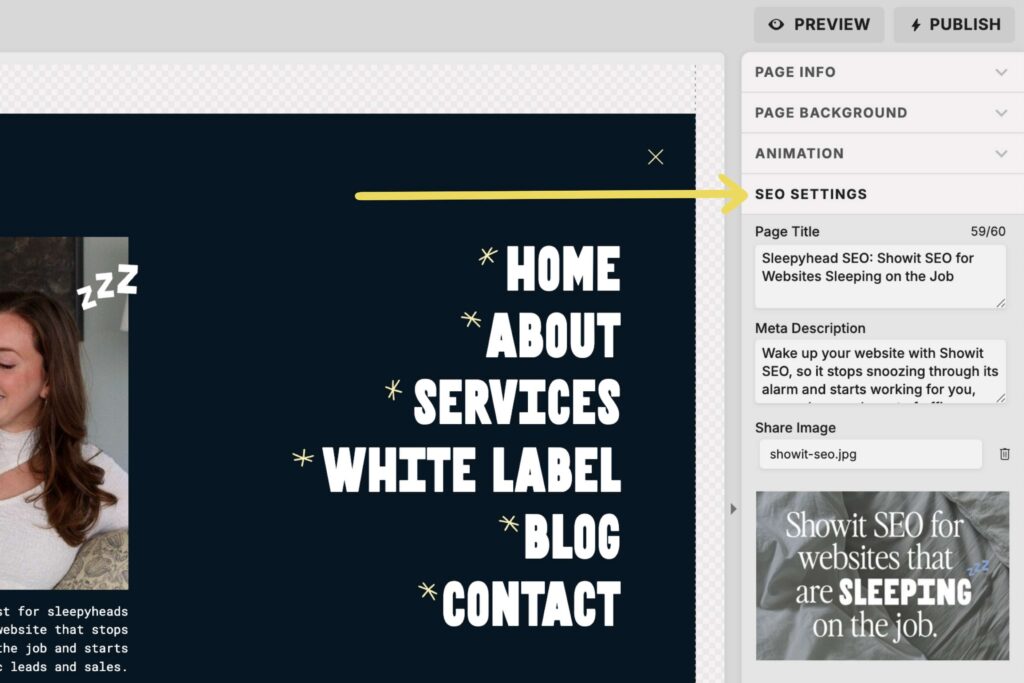
There’s a character counter for the page titles, but not meta descriptions. So I use this tool to check character counts.
BTW, you can go over the recommended character counts — 60 characters for page titles & 160 for meta descriptions. Sometimes it’s necessary even just to fit your full business name. And sometimes it just makes sense.
Google can still read these in full, but they will cut off for your human readers, so it’s important not to hide info you really want them to see beyond those constraints.
That same meta length checker tool is also great for a visual preview of what your metadata will look like on Google. Some website platforms have this built into their SEO settings. Showit does not. 🙁
ℹ️ Google can and often does rewrite page titles and meta descriptions. While you can’t really control it, best practice is to literally just describe what people will find on that page. The more relevant and helpful, the better.
Re: URL Slugs
As you design your Showit website, you’ll name your pages in the page menu.
Most website platforms let you name a page and customize the URL slug. This makes is easy for you to find each page in the backend of your site &
To that, Showit said, “Nah.” 😎
In Showit, whatever you name the page in the page menu is what your URL slug will be.
For example, I have a white label SEO offer for Showit designers and another one for copywriters. For organizational purposes in the backend, it would make sense for me to have a “White Label Offers” folder and name the two pages underneath that: “For Designers” and “For Copywriters.”
But if I did that, those URL slugs would have been: “for-designers” and “for-copywriters.”
I didn’t want that. So I named the pages with their focus keywords instead.
The other problem is that renaming a page breaks all of the existing links associated with the original page name.
So, if I had first named the copywriters page “For Copywriters,” designed my whole site, linked a bunch of calls to action to that page, and THEN changed the page name to get my keyword in the URL slug, all those links would break and I’d have to find & relink them.
Womp womp.
What do you need to do?
It’s best to be absolutely certain what you want your page names/URL slugs to be before designing & publishing your whole website. Sometimes, things change. But know that if you do change a page name down the line, you’ll need to:
- Set up a redirect
- Relink everything that was linked to the previous version of that page
Re: Image Optimization
The image optimization section in the backend of Showit includes space for an image title and alt text. It looks like this:
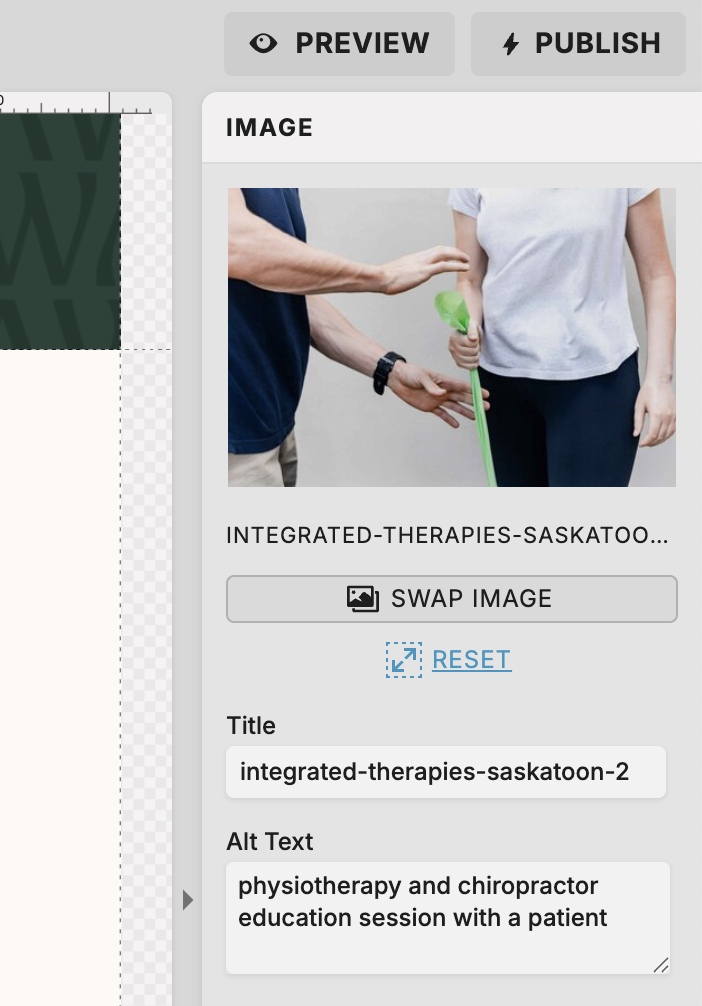
The “Title” space is auto-filled with the file name of your image. You can update the contents of this field, but doing so doesn’t impact your SEO.
(I told you it’s quirky!)
Instead, you’ll need to you properly name and size your images before uploading them to Showit.
Next, the “Alt Text” space is where you put your alt text. Straightforward. But there’s a catch…
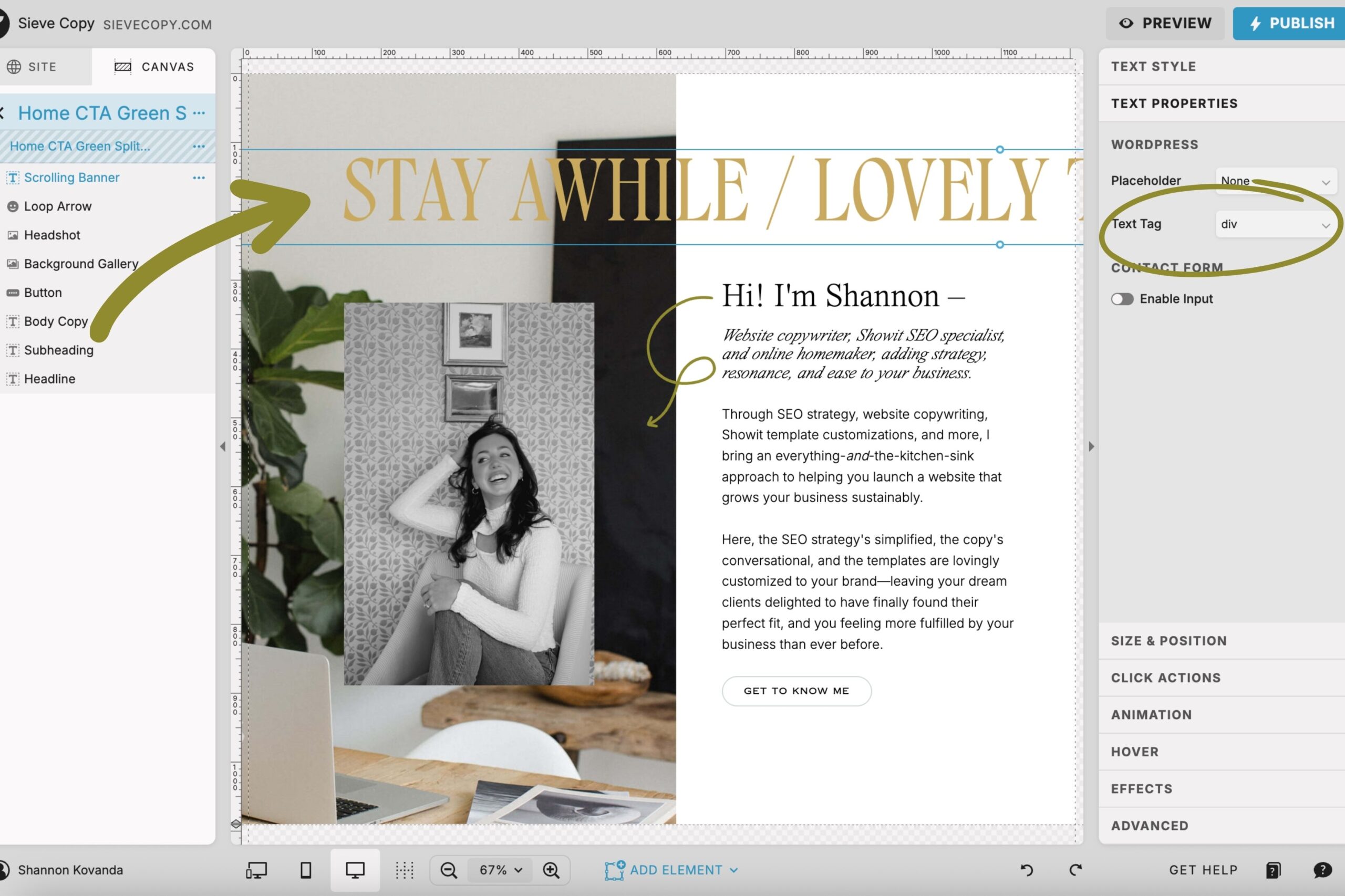
Currently, Showit automatically codes images as “div”, not “img” assets.
In other words, this essentially means Google is ignoring them. (Yikes.)
“Img” tags are useful for both accessibility and SEO purposes, so even though this is something the Showit team is aware of and working on, it’s not ideal.
Because they are working on it though, I still recommend setting all your alt text in the backend so you’re prepared when it is in fact fixed. That’s why I still optimize images as part of my Showit SEO services too.
Common Oversights in Showit that You Need to Know About
Google can still see your hidden elements & canvases.
In Showit, you can hide certain elements or sections (aka canvases) from mobile view, desktop view, or both. This is especially helpful if you’re setting up sections to publish later.
Potential clients viewing your site can’t see hidden sections, but they still load in the code of your website, which means Google can see them.
Which means you need to make sure they aren’t hiding mistakes that might be hurting your SEO.
Before hiding an element or canvas within Showit, make sure you check for:
- Broken links
- Duplicate h1 tags (there should only be one per page, ideally in the top/first section of that page)
- Large image file sizes that can still slow down your site
- Placeholder content completely unrelated to your niche, industry, offerings, etc. (if you’re an interior designer and you have multiple hidden sections across several pages that have placeholder text talking about website design, Google could get confused)
What to do:
It’s best to remove these sections altogether or completely optimize them and then hide them until you’re ready to publish them later on.
Every text element you add automatically assigns a default text tag.
(And usually not the one that’s ideal for SEO.)
In Showit, you have complete control over the way your website looks. This is a huge selling point for most people that sign up for Showit. But that also comes with more opportunity for things to awry.
Before you begin customizing your site, you set your font styles in Showit’s “Design Settings”:
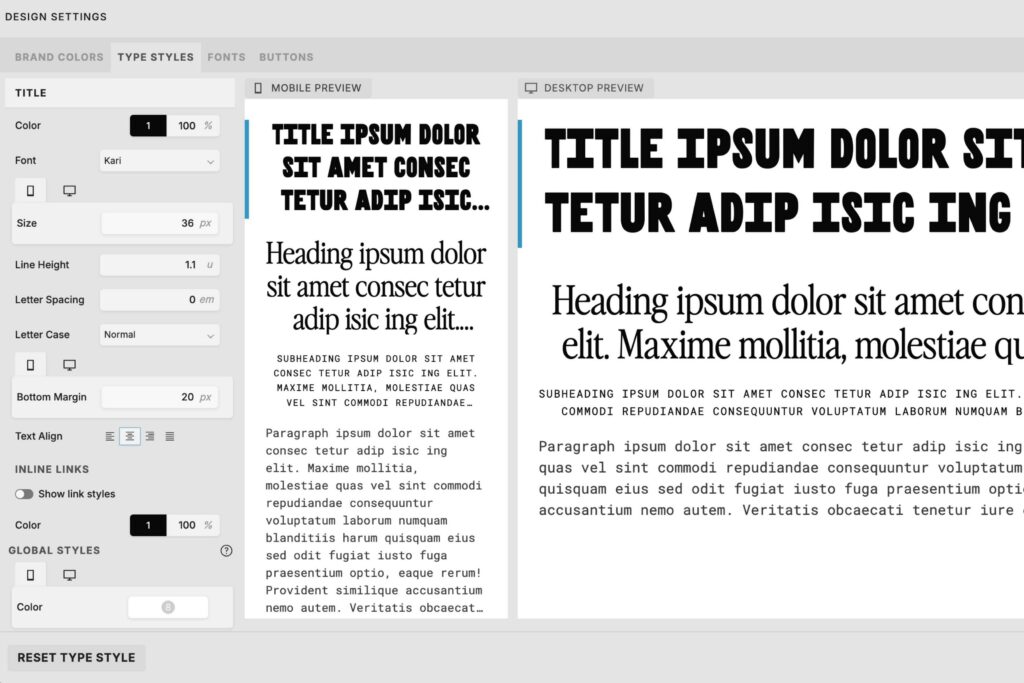
Later, if you want to apply the style of your “Title” design settings to a headline half-way down the page, Showit will auto-assign an “h1” tag to that headline.
Do this 5 more times, and suddenly you have h1’s all over your page, confusing the heck out of Google.
What to do:
My process is to input all the copy and fully design the page before assigning text tags.
If you’re just adding one new section, always check and fix your text tags before publishing.
Copying a page also copies its SEO settings.
Oftentimes, it makes sense to copy one fully designed page to start another like it. Each time you do this, all the settings of that page are copied too.
So if I copied my Showit SEO sprint page to create my done-for-you Showit SEO page:
- The URL slug (aka page name) would be “Showit SEO Sprint-1”
- The same page title would apply to the new page
- The same meta description would apply to the new page
- If you had selected “Ask Google not to track” on the first page, it would also apply to this page
Forgetting to update any of these settings would create SEO problems that are often difficult to pinpoint later on.
What to do:
If you duplicate a page in Showit, update the page name, “SEO Settings” tab, and “Advanced Settings” tab before customizing to avoid later headaches.
TL;DR: Is Showit good for SEO?
Yes! Because SEO is about knowing where to look and what to be cautious of within your website platform… not so much whether or not the website platform itself is “good” for SEO or not.
So if you think Showit isn’t good for SEO, you just don’t know Showit well enough.
But now that you’ve read this guide, you can optimize your Showit website knowing you’re not left in the dark about any of its features.
Want to get your first month of Showit for free? Use my link and code SLEEPYHEADSEO for your first month on me while you optimize.
BTW, have we met yet? I’m Shannon, a Showit SEO Specialist who helps wake up websites that are sleeping on the job. Because you should be resting easy knowing your website is working for you around the clock. Want more support? Here’s how I can help you:
- Keep reading my blog for more Showit SEO tips.
- Browse my Showit SEO services to officially take SEO off your plate.
- Subscribe to The Snoozeletter for one simple SEO tip in your inbox every Tuesday evening.
+ view the comments